
You opened your analytics this morning, saw that a demo form converts at 2%, and you still have no idea why the other 98% leave. Charts tell you where people drop. They do not tell you what the person was trying to do in the ten seconds before they closed the tab. Session replay does, if you watch the right recordings and set up the privacy controls before you record anything. This guide explains what to look for, how many sessions to watch, and the settings to check first.
Most B2B teams install a recording tool, watch three videos the first week, and never open it again. That is the pattern worth breaking, because a handful of replays on your pricing page or demo form usually surfaces the friction a funnel chart hides.
1. What the research actually supports
Session replay is a recording of one visitor's screen as they move through your site: the pages they load, where their cursor goes, what they click, where they scroll, and where they stop. Nielsen Norman Group's usability research has argued for decades that watching real people use an interface tells you more than any dashboard, because you see the hesitation and the misread label. Session replay is the at-scale, after-the-fact version of that same observation. You can read the Nielsen Norman Group research articles for the broader case on watching users instead of guessing.
Replay does not tell you why someone acted. It tells you what they did. The why comes from you forming a guess and then testing it. Treat each recording as one observation. A single session where a buyer rage-clicks a non-link is a hint. Twelve sessions doing the same thing is a problem worth fixing this week.
2. Fix privacy before you record a single visitor
Session recording captures what is on the screen, which on a B2B site means names, work emails, company data typed into forms, and sometimes figures a prospect pastes into a calculator. Get the settings right before you turn it on.
- Mask form inputs by default. Most tools let you suppress all text fields and selectively unmask the harmless ones. Start fully masked and open up only what you need.
- Block sensitive fields explicitly. Payment details, passwords, and any field carrying personal data should be excluded at the tool level, not left to a visitor's trust.
- Respect consent and regional rules. If you serve EU visitors, recording is processing. Tie it to your consent banner so it only runs where you are allowed to run it.
- Set a retention window. Keep recordings for a fixed period, 30 to 90 days is common, and let them expire. You rarely need a nine-month-old replay.
None of this is optional cleanup for later. A recording with an unmasked email field is a liability you created on purpose. Configure it first, confirm it on a test session, then open it to real traffic.
3. Where session replay earns its keep on a B2B site
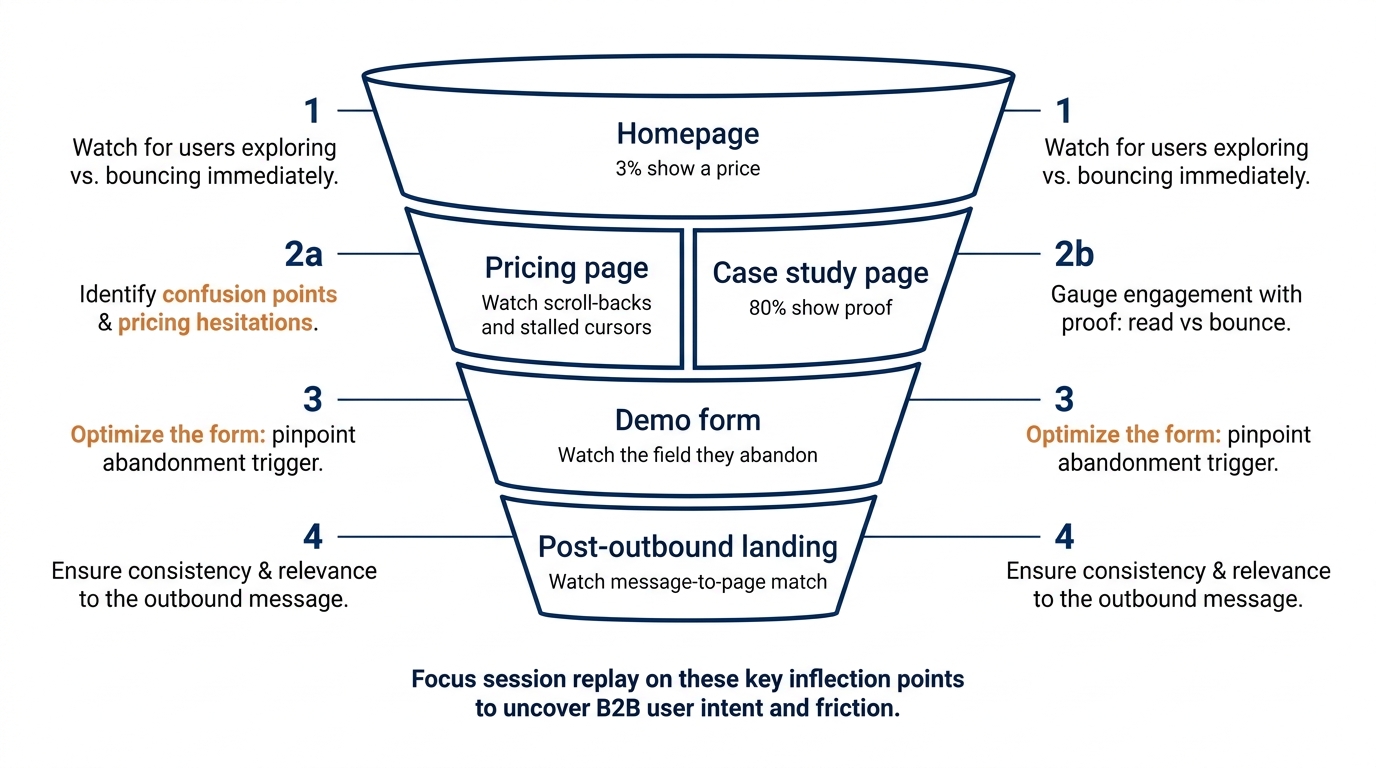
Replay pays off on the pages where a buyer makes a decision, not the ones where they browse. On our homepage index of 118 B2B service firms in November 2026, only 3% showed a price and 33% asked the visitor for nothing at all. That means the moment of friction usually sits a click or two past the homepage, on the pages below.
- Pricing page. Watch where cursors stop and where people scroll back up. Hesitation on a pricing page often means the plan names or the "contact us" tier are doing the confusing, a pattern close to the decision fatigue that stalls B2B buying committees.
- Demo or contact form. Watch which field a visitor abandons on. When half your form submissions stop at "company size," the form itself is the barrier keeping qualified visitors from converting.
- Case study and proof pages. 80% of the firms in our index show case studies, so the question is whether buyers actually read yours or bounce off a wall of logos, a form of the bandwagon effect that only works when the proof is legible.
- The page after an outbound click. If your follow-up email after a sales call links to a page, replay tells you whether that landing page matched what you promised in the message.
Mouse tracking inside each replay is the cheap signal here. Where the cursor hovers without clicking usually marks something the visitor expected to be a link and was not.
4. How many sessions to watch, and which ones
You do not need to watch everything, and you should not try. The aim is to spot a repeated pattern, which most pages reveal inside 10 to 20 targeted recordings. Random sampling wastes your afternoon on visitors who were never going to convert. Filter first, then watch.
Filter for intent, not volume
Watch sessions that reached a decision page, spent more than a trivial amount of time, and then left without converting. That group holds your answers. Add filters for rage clicks, dead clicks, and rapid scrolling if your tool flags them, because those are the sessions where something broke.
Watch in batches and write as you go
Open five to seven recordings for one page in a single sitting and keep a running note of what you see: the field everyone skips, the paragraph nobody scrolls past, the button people click twice. Patterns show up fast when the sessions are grouped. One recording is an anecdote. Seven on the same page with the same stall is a finding you can act on. Watching real people this way is a budget-friendly alternative to formal testing, and it pairs well with the lightweight methods in our guide on user testing a B2B website on a small budget.
5. A worked example on one demo form, illustrative only
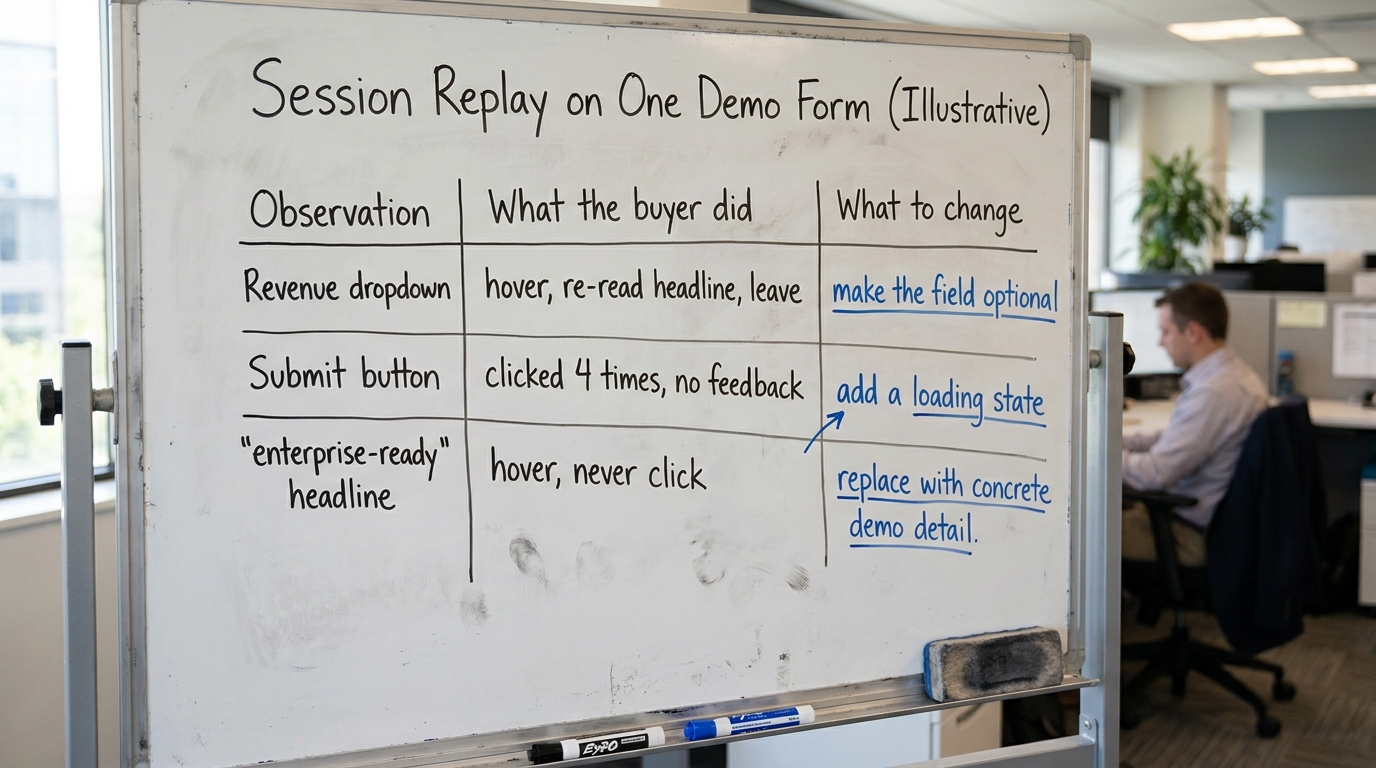
The following is an illustrative walkthrough, not a client result. Say you watch 14 sessions on a demo request form that converts at 2%. Here is the kind of thing replay surfaces and what you would do with it.
- What you see: nine of the 14 visitors fill in name and email, reach a required "annual revenue" dropdown, hover on it for several seconds, scroll up to re-read the headline, and close the tab. The what to change is to make revenue optional or remove it, since it is stopping people before they can convert.
- What you see: four visitors click the submit button, nothing visibly happens for a moment, and they click it three more times before leaving. The what to change is a loading state on the button, because the form was working and the visitor could not tell.
- What you see: cursors repeatedly hover over the phrase "enterprise-ready" in your headline, a word 49% of firms in our index lead with, without clicking. The what to change is to replace vague AI-era wording with a concrete line about what the demo shows.
None of those three are visible in a conversion chart. All three are obvious in 14 recordings. That gap is the entire reason to run session replay. Treat each change as a hypothesis and confirm it afterward, because a clean before-and-after read requires discipline that Ron Kohavi, Diane Tang and Ya Xu lay out in their book on trustworthy online controlled experiments.
6. Turn what you see into changes
The point of watching is to change the page, so keep a simple map from observation to action. The table below is the work product: pull it into your own doc and fill the right column after each batch of replays. It covers the common places a B2B sale stalls, what the buyer tends to do there, and the change that usually clears it.
| Where it shows up | What the buyer does on replay | What to change |
|---|---|---|
| Pricing page | Scrolls to pricing, scrolls back up, stalls on the "contact us" tier | Show a starting number or a range so the tier is not a dead end (only 3% of firms show any price) |
| Demo or contact form | Abandons at one specific required field | Make that field optional or move it after submission |
| Headline, first screen | Hovers on AI or buzzword phrasing without clicking | Replace vague wording with what the product does for their role |
| Case study page | Scans logos, never opens a story, bounces | Lead with one legible result and a named outcome, not a logo grid |
| Navigation menu | Opens the menu, reads top to bottom, backs out | Reorder items so the two that matter sit first and last, per the serial position effect in menus |
| Post-outbound landing page | Lands, scrolls once, leaves in seconds | Match the page's first line to the promise in your outbound message |
7. What replay cannot tell you
Session replay shows behavior, not reasons, and it is easy to over-read a single video. Watching one buyer stall does not prove a bias explains the whole purchase. A visitor who leaves a pricing page might be comparison shopping, might have found the number too high, or might have been called into a meeting. Replay narrows the list of likely causes, it does not close it.
Two habits keep you honest. First, pair replays with a quantitative signal, so a pattern you saw in seven recordings is backed by a drop you can measure. Second, when you make a change, verify it rather than assuming the fix worked, since small samples mislead in predictable ways that Evan Miller details in how not to run an A/B test. The reason a page confuses buyers is often plain cognitive overload, and our guide on cognitive load on B2B websites covers how to reduce it once replay shows you where it builds.
8. What to change on your page this week
You can get a useful read in a single afternoon. Work in this order so the privacy setup is done before any real visitor is recorded.
- Turn on form masking, block sensitive fields, tie recording to consent, and set a 30 to 90 day retention window. Confirm it on a test session.
- Pick one decision page: pricing, demo form, or your main case study page.
- Filter for visitors who reached that page, stayed more than a few seconds, and left without converting.
- Watch 10 to 15 of those recordings in one sitting and note every repeated stall, dead click, and hover-without-click.
- Pick the single most common friction and ship one change this week, using the observation-to-action table above.
- Verify the change against a before-and-after number rather than trusting the first bump you see.
If the stalls you keep seeing are grouping, scrolling, and scanning problems rather than single-field problems, the fix is usually visual order, which we cover in Gestalt principles in web design and what they change on a B2B page. And if you want a sense of how your first screen compares before you watch a single replay, our homepage trends from November 2026 show what 118 B2B firms are doing above the fold.
Want a fast outside read on your own first screen before you start recording? Run Behavly's free homepage check on your page and see what a visitor notices in the first few seconds.