
A buyer lands on your pricing page, reads three lines, and leaves without filling in the form. Most teams treat that as a messaging problem and rewrite the benefits. The faster explanation is that the page gave the reader no reason to believe inaction costs anything. Loss aversion, the tendency to feel a potential loss more heavily than an equal potential gain, is the reason a page full of upside can still fail to move someone who is doing fine without you.
This guide explains the research, shows where loss aversion shows up on real B2B pages and in a live sales process, works through one illustrative example, and ends with what to change this week. Make the cost of staying put as concrete as the benefits you already list.
1. What the research actually says
The original work comes from Daniel Kahneman and Amos Tversky, who built prospect theory in 1979 to describe how people weigh gains and losses. They found that a loss of a given size feels larger than a gain of the same size. Losing $100 stings more than finding $100 pleases. Kahneman later received the Nobel Prize in Economic Sciences in 2002 for this body of work.
That asymmetry matters for anyone writing a B2B page because your buyer already owns a status quo. They have a current vendor, a current spreadsheet, a current workaround that mostly functions. Switching means risking something that works for something unproven, and loss aversion makes that risk loom large. For a plain reference on the underlying mechanism, The Decision Lab keeps a readable summary of prospect theory and the biases around it.
One caution before you build anything on this. A single bias never explains an entire purchase. Loss aversion sits alongside confirmation bias in B2B buying and the sunk cost fallacy in vendor decisions, and a buyer weighs all of them against budget, timing and internal politics. This is one mechanism among several that shape whether your page converts.
2. Why gain-only copy underperforms
Walk through a typical homepage first screen. It promises faster workflows, better data, a smarter stack. Every line is a gain. The reader, reading as someone who already has a working setup, mentally discounts each promise against the effort and risk of change. The copy asks them to want something new; it never tells them what their current situation is quietly costing.
Behavly's November 2026 index of 118 B2B service firms found 49% leading their first screen with AI wording and 80% showing case studies, which are gain and proof signals. Far fewer frame the reader's current position as a cost worth fixing. That gap is where loss aversion marketing earns its keep, by naming a loss the buyer is already absorbing without noticing.
The distinction that keeps this honest: cost of inaction copy describes a real, measurable thing the reader can verify, while fear selling invents a threat and inflates it. The first respects the buyer. The second gets caught.
3. Where loss aversion shows up in a B2B sale
It appears in more places than the homepage. The table below maps the common ones so you can audit your own funnel against it.
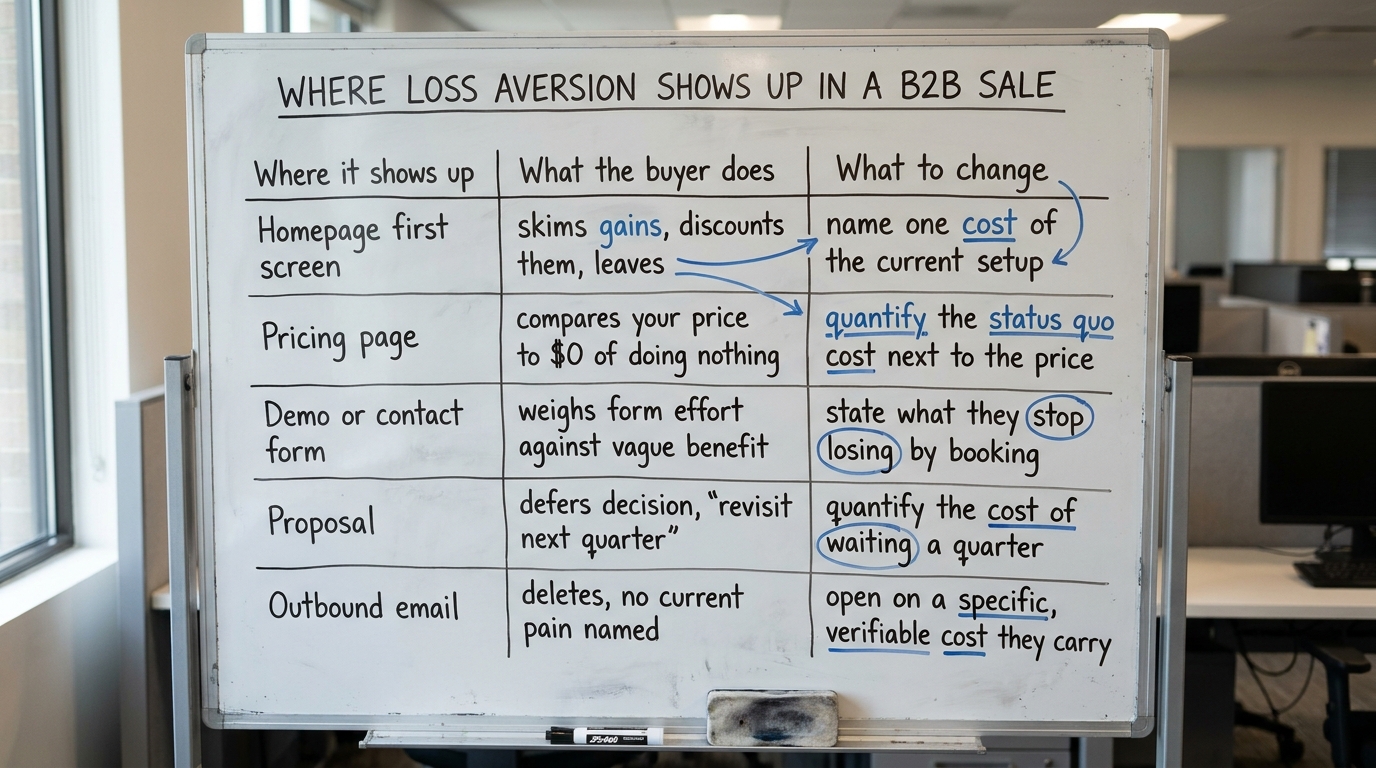
| Where this shows up | What the buyer does | What to change |
|---|---|---|
| Homepage first screen | Skims the gain promises, discounts each against switching effort, leaves | Name one concrete cost the buyer's current setup is absorbing, then point at the fix |
| Pricing page | Compares your price not to competitors but to the $0 of doing nothing | Put a quantified status-quo cost beside the price so the comparison is fair |
| Demo or contact form | Weighs the effort of filling the form against a vague future benefit | State plainly what they stop losing by booking, not just what they gain |
| Proposal or SOW | Defers the decision, says "let's revisit next quarter" | Quantify what waiting a quarter costs in their own units, with the line item visible |
| Outbound email | Deletes it because no current pain is named and switching feels expensive | Open on one specific, verifiable cost the reader already carries today |
Read down the middle column. In every row the buyer is comparing you against the cost of nothing, and the cost of nothing reads as zero until you make it visible. That is the entire job.
4. How to write cost of inaction copy that holds up
Cost of inaction copy works when it is specific, attributable and checkable. The reader should be able to nod and say yes, that is roughly my situation, rather than feeling pushed. Four rules keep it on the right side of the line.
Anchor on the buyer's own numbers
A loss the reader can compute is far stronger than one you assert. "Teams your size that run this manually spend roughly a day a week reconciling it" lets the reader multiply by their own headcount. You supplied the frame; they supplied the loss, which makes it theirs.
Name the loss, then the remedy, in that order
Loss aversion predicts the loss gets more attention than the gain, so lead with it. State what the current setup costs, then state what you remove. Reverse the order and the gain gets discounted before the loss ever registers.
Keep it verifiable, not catastrophic
If the cost you name cannot be checked, it reads as fear selling and the rest of the page loses credibility with it. Nielsen Norman Group's usability research repeatedly finds that overstated claims push users to distrust the whole page, not just the line that overreached. You can read their body of work at the Nielsen Norman Group research library.
Attach the loss to a single, concrete decision
"Delay this and you lose a quarter of onboarding you cannot get back" beats "the market is moving fast." The first ties the loss to one choice the reader controls. The second is weather.
5. A worked example on one pricing page (illustrative)
The following is illustrative, built to show the mechanism, not a client result. Picture a pricing page for a B2B data integration service. The current version reads:
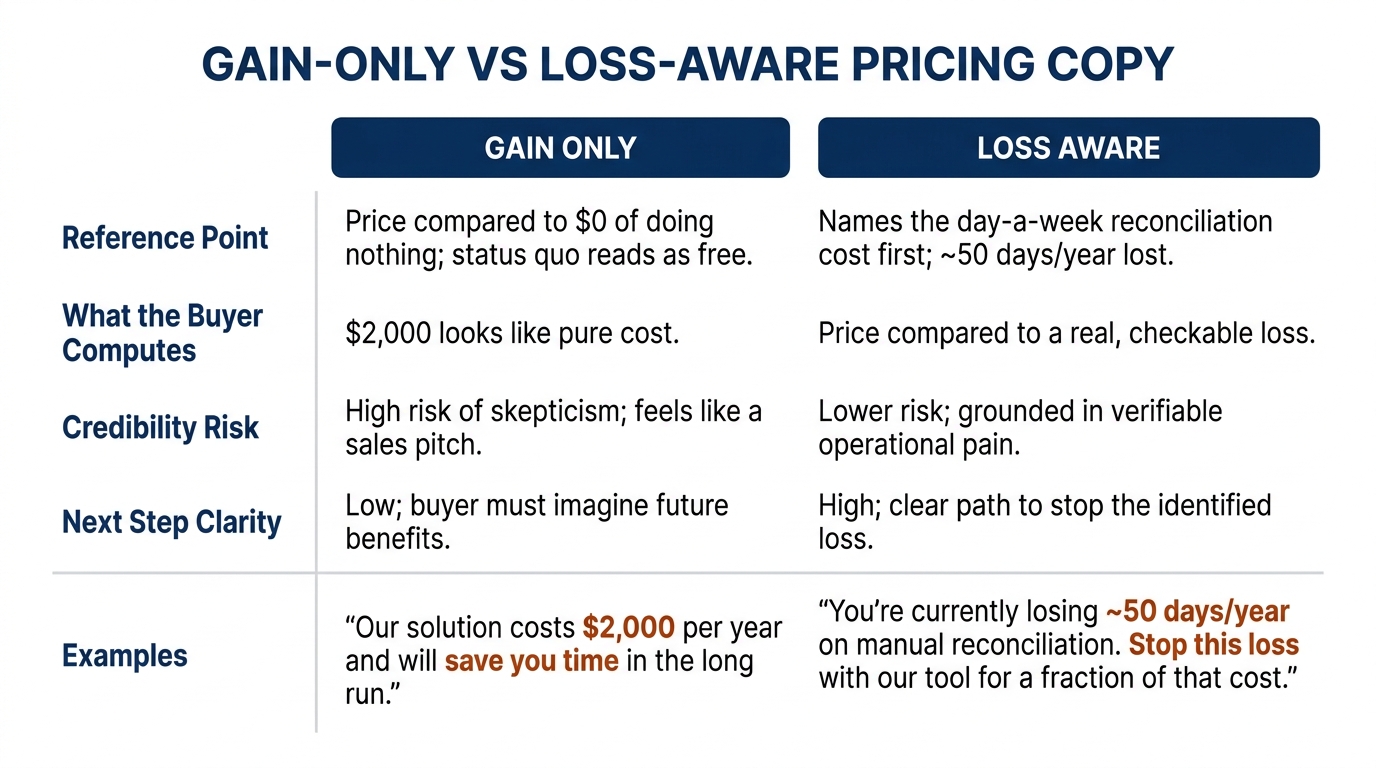
"Connect your tools and get a unified dashboard. Plans from $2,000/month."
Every word is a gain, and the reader compares $2,000 against the $0 of their current spreadsheet, which works well enough on a Tuesday. The price looks like pure cost because the status quo looks free. Behavly's index found only 3% of the 118 firms show a price at all, so most pages never even reach this comparison; the ones that do often lose it here.
A loss-aware version keeps the gain but makes the status quo's cost visible first:
"Reconciling tools by hand runs most ops teams your size about a day a week. That is roughly 50 days a year your team spends copying data instead of using it. Our integration removes that. Plans from $2,000/month."
Now the $2,000 is compared against a named, computable loss rather than against zero. The reader can check the day-a-week figure against their own experience, keeping it on the honest side of fear selling. Nothing here is invented or inflated; it reframes a real cost the buyer was already paying silently. For how the status-quo bias compounds this on live pages, the homepage trends from November 2026 show how rarely firms frame the reader's current position as a cost at all.
6. Outbound email, where the loss has to come first
Cold email gives you one sentence before the reader decides. Open on a gain and you are asking a stranger to want something; open on a named, specific loss they already carry and you have their attention for the next line. The constraint is accuracy, because an outbound claim is easier to disprove than a homepage line, and a wrong one ends the thread.
So do the research first. Reference something true about their current setup, the cost it implies, and one concrete remedy. Skip the manufactured urgency and the fake deadline; those are the fear-selling tells that get outbound filtered. BehavioralEconomics.com keeps useful background on how reference points shape these judgments, at BehavioralEconomics.com, if you want the mechanism behind why the first reference point sets the frame.
7. Where loss aversion tips into fear selling
The same bias that makes cost of inaction copy work makes fear selling tempting, and the two look similar from a distance. The difference is whether the loss is real and whether the reader can verify it. A named, checkable cost respects the buyer. An inflated or invented threat treats them as a mark, and once they catch one, they discount everything else on the page.
Prospect theory describes how people weigh real losses. Kahneman and Tversky measured the effect on decisions people were already making, with costs they were already paying. If you cannot attribute the cost to the reader's own situation with a figure they can test, cut it. A weaker honest line beats a strong line that collapses under one skeptical question in a sales call.
8. What to change on your page this week
Pick your highest-traffic page and run it against this checklist. None of these require a redesign; each is a copy edit you can ship in an afternoon.
- Find the first screen and check whether it names any cost of the reader's current setup. If every line is a gain, add one concrete status-quo cost.
- On your pricing page, place a quantified cost of inaction next to the price. The reader then compares against a real number rather than against zero.
- Rewrite one demo or contact-form line to say what the reader stops losing by booking, in their own units.
- Check every loss you name for verifiability. If the reader cannot test it against their own experience, cut or rephrase it.
- Reorder one section so the loss comes before the remedy. The reader then encounters the cost first and the fix second.
- Scan your outbound template for manufactured urgency and fake deadlines, and replace them with one true, specific cost the reader already carries.
Work through loss aversion this way and you are editing one lever among several. The same audit catches where confirmation bias shapes what your buyer believes about your claims and where the sunk cost fallacy keeps them loyal to the vendor you are trying to replace. Reading the page for all three at once beats fixing one in isolation.
If you want a second read on where your first screen leans too far toward gains, run Behavly's free homepage check and see what a buyer discounts before they reach your form.