
A buyer lands on your pricing page ready to ask for a quote. Before they type anything, they scan for proof that you are real, that other companies like theirs have paid you, and that handing over an email will not turn into a week of sales calls. If that proof is missing, they leave, and you never see it in your analytics because a form that was never started leaves no trace. In our November 2026 index of 118 B2B service firm homepages, 33% ask the visitor for nothing at all, and only 3% show a price. The buyer is checking for trust signals you have not put on the page.
This guide explains what trust signals are, which ones buyers actually check, and how to rank them by how hard each is to fake. Then it shows where each one belongs on a real B2B page, works through one illustrative example, and ends with what to change this week.
1. What the research says about trust signals
The clearest body of work here comes from the Nielsen Norman Group, whose usability research has repeatedly found that B2B buyers look for credibility cues before they commit any effort, and that vague claims without evidence raise suspicion rather than lower it. You can read their ongoing studies on credibility and trust in their research articles.
The Baymard Institute, which runs large-scale usability testing on e-commerce and lead-generation flows, has documented how missing or weak trust elements around a form drive abandonment, and how security cues and clear policies reduce hesitation at the point of submission. Their UX research is worth reading if you own a form.
The underlying behavior is simple. People judge an unfamiliar company the way they judge an unfamiliar person, by looking for evidence that others have already trusted it and been fine. Robert Cialdini named this social proof in his work on influence, and it is why a wall of client logos does more work than another adjective about your quality. The job of a trust signal is to answer one question the buyer is asking silently: who else like me already works with these people.
2. Rank your trust signals by how hard they are to fake
Not all trust signals carry the same weight, because buyers have learned that some are trivial to invent. A testimonial attributed to "Sarah, Marketing Director" carries almost nothing, because anyone can type it. A named person at a named company with a title the buyer can verify on LinkedIn carries a great deal, because faking it is public and checkable.
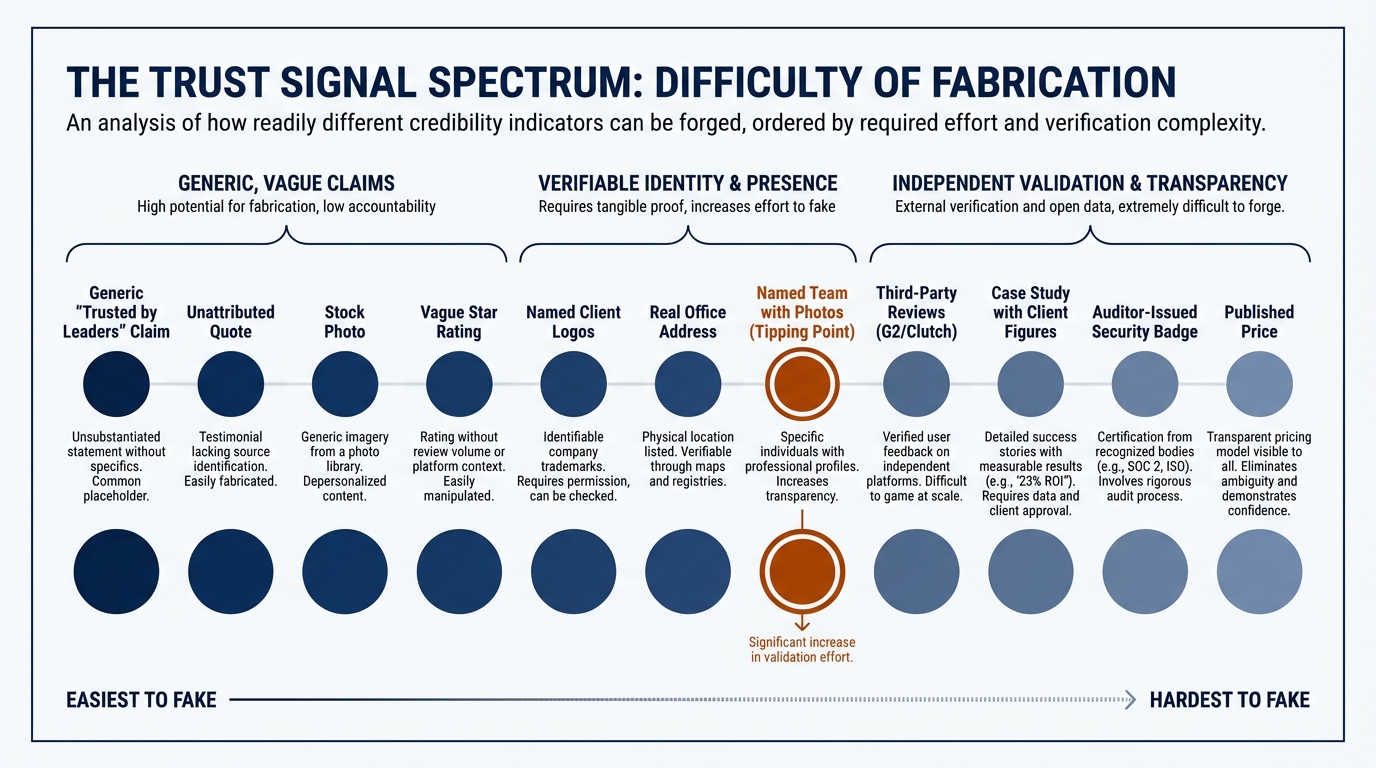
Rank your evidence the way a skeptical buyer does, from easiest to fake to hardest.
- Easiest to fake: generic claims ("trusted by industry leaders"), unattributed quotes, stock photos of smiling people, vague star ratings with no source.
- Harder: named client logos, a real office address, named team members with photos and titles.
- Hardest to fake: third-party reviews on a platform you do not control (G2, Clutch, Google), case studies with figures the client would have to deny, security certifications issued by an auditor, and a published price.
A price is one of the strongest signals precisely because so few show one. In our index, 3% of B2B firms display a price on the first screen. A number commits you, and buyers read that commitment as confidence.
3. Where trust signals show up on a B2B website
Trust signals are not a section you add once in the footer. Each one belongs where a specific doubt surfaces, and the doubt changes as the buyer moves down the page and through the sale.
The homepage first screen
This is where the buyer decides whether to stay. Client logos and a specific, verifiable claim do more here than another line about your approach. In our index, 80% of firms show case studies somewhere, but far fewer surface named proof in the first screen where the decision to stay actually happens. If you are still deciding what that first screen should say, our guide on how to write a B2B value proposition covers the claim itself, and this is the evidence that backs it.
The pricing page
Here the doubt is about cost and about what happens after they ask. Reviews, case studies with figures, and a clear statement of what the next step involves reduce the fear that a quote request becomes a trap.
The form itself
At the point of submission, the buyer worries about spam and about who will call. A short privacy line, a note on how fast you reply, and a security badge where you actually process data all lower hesitation. Do not paste a security badge that links nowhere, because a fake-looking badge is worse than none.
The proposal and the sales call
Trust signals do not stop at the website. A proposal that names a reference the buyer can call, or a call where you point to a client in their exact sector, is the same social proof moving offline. This matters because buyers filter new evidence through what they already believe, a pattern we cover in confirmation bias in B2B buying. The right named client makes your claim fit the story they already want to believe.
4. The table to build your trust signals from
Use this to map each place a buyer pauses, what they are doing there, and the signal that answers it. Treat it as the working spine of your page audit.
| Where it shows up | What the buyer does | What to change |
|---|---|---|
| Homepage first screen | Scans for proof you are real and used by companies like theirs | Place 4 to 8 named client logos and one specific, verifiable claim above the fold |
| Pricing page | Weighs cost and fears the quote request becomes a sales trap | Add a case study with a figure, two named reviews, and a plain line on what the next step is |
| Demo or contact form | Hesitates over spam and who will call | Add a one-line privacy note, your reply time, and a security badge only where data is processed |
| About or team page | Checks that real, named people stand behind the work | Show real photos, full names, titles, and a verifiable office address |
| Outbound email | Decides in two seconds whether you are credible | Name one client in their sector in the first line, not a generic value claim |
| Proposal | Looks for a reference and evidence the result is repeatable | Include a named reference willing to take a call and one labeled result |
5. A worked example on one pricing page (illustrative)
The following is illustrative, not a real client, so the figures are placeholders you would replace with your own verifiable numbers.
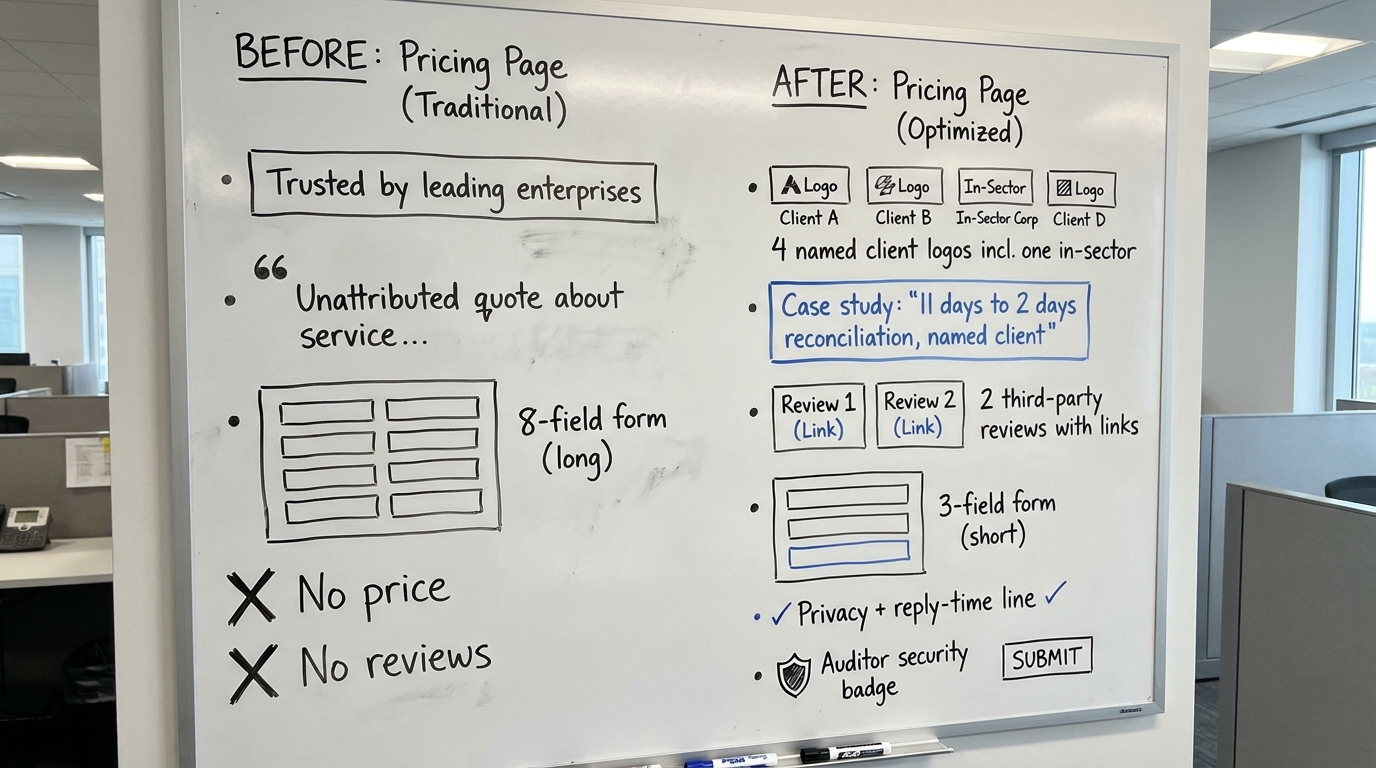
Imagine a B2B data integration firm with a pricing page that reads: "Trusted by leading enterprises. Flexible plans to fit your needs. Contact us for a quote." There is one unattributed quote and a contact form with eight fields. A buyer in logistics lands here, finds nothing that proves another logistics company paid this firm, cannot tell what the engagement costs, and sees eight fields guarding an unknown. They leave.
Now rebuild it with trust signals ranked by strength. Replace the generic banner with four named client logos, one of them in logistics. Under the plans, add a short case study: "Reduced monthly reconciliation from 11 days to 2 for a mid-market logistics operator," with the client named and quotable. Add two reviews pulled from a platform you do not control, with links. Cut the form to three fields, add the line "We reply within one business day and never share your details," and place your auditor-issued security badge beside the submit button.
Nothing about the service changed. What changed is that every doubt the buyer raised now has an answer sitting next to it, and the strongest answers (a named peer, a checkable figure, a third-party review) are the ones hardest to fake.
6. The mistakes that turn a trust signal into a liability
A trust signal fails when it looks invented, and buyers are now primed to spot that. Half of the firms in our index lean on AI wording in the first screen (49% in November 2026), which trains buyers to discount polished language and look harder for concrete proof. You can see the full pattern in our homepage trends for November 2026.
- Logos with no permission or no relevance. A famous logo that is really a one-off trial reads as a stretch; a logo in the buyer's own sector reads as proof.
- Testimonials you cannot verify. If the buyer cannot find the person, the quote works against you.
- Security badges that link nowhere. A badge that is an image file, not a verifiable certificate, signals the opposite of security.
- Review counts with no source. "Rated 4.9 by our customers" means nothing without a platform behind it.
The deeper reason this works is that trust judgments are fast and intuitive, the kind of thinking Daniel Kahneman described in the work that earned him the 2002 Nobel Prize in Economic Sciences. Buyers decide in seconds whether something feels credible, then look for reasons to confirm it. Hard-to-fake evidence gives that fast judgment something solid to land on.
7. What to change on your page this week
You do not need a redesign. You need to move your hardest-to-fake evidence to where the buyer pauses, and delete the signals that look invented.
- Put 4 to 8 named client logos on your homepage first screen, with at least one in your buyer's main sector.
- Replace every unattributed quote with a named person, title, and company, or remove it.
- Add one case study with a real figure to your pricing page, and name the client.
- Cut your form to the fields you genuinely act on, and add a one-line privacy and reply-time note beside it.
- Check every security badge resolves to a verifiable certificate, and remove any that is only an image.
- Link your two best third-party reviews from a platform you do not control.
If you want to see how your homepage compares with the 118 firms we track, our write-up of homepage design lessons from 118 B2B service firms shows where most pages lose the buyer before the form.
Run Behavly's free homepage check on your own page to see which trust signals a first-time buyer finds, and which ones they go looking for and never find.