
The first number a buyer sees on your site sets the range they judge every later number against. If a prospect reads $90,000 on an enterprise tier before they reach the $12,000 tier, the $12,000 feels modest. If they see nothing until a sales call, the first figure they hear from you competes with whatever they imagined on the way in, and most imagined figures are low. That is price anchoring at work, and it runs whether or not you decided to use it.
Most B2B service firms leave it to chance. In Behavly's November 2026 index of 118 B2B service homepages, only 3% show a price at all. The rest let the buyer form a reference price from competitors, from AI assistants, or from a guess, and then arrive at the sales conversation already anchored to something you did not set.
1. What the research says
Price anchoring comes out of the anchoring and adjustment work by Amos Tversky and Daniel Kahneman in the 1970s. People estimate an unknown value by starting from whatever number is in front of them and adjusting, and the adjustment is almost always too small. Kahneman's later summary of this research is part of what the Nobel committee cited when it awarded him the 2002 Nobel Prize in Economic Sciences.
The practical point for a pricing page is narrow. Your buyer does not hold a fixed idea of what your work is worth. They hold a reference price, and that reference price is pliable. The first credible number you put in front of them becomes the anchor, and every option after it gets read as cheaper or dearer relative to that anchor rather than on its own merits. The Decision Lab has a plain write-up of the anchoring bias if you want the mechanism without the textbook.
Anchoring is one input to a purchase. A buyer who distrusts you will not be moved by a clever tier order. Anchoring decides how a number is read, but it does not decide whether the buyer wants the thing.
2. Where price anchoring shows up on a B2B website or in a sale
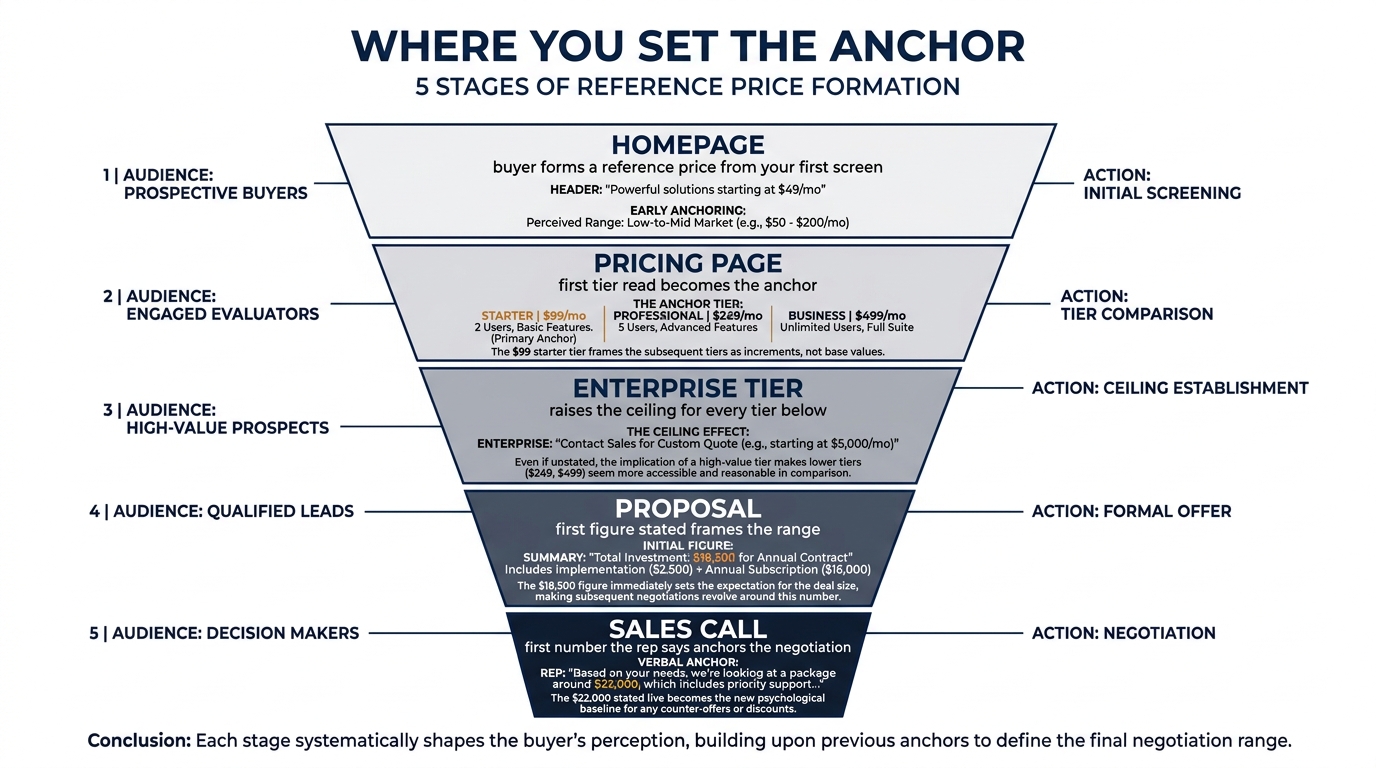
You set an anchor at several points, and usually without meaning to.
Tier order on the pricing page. Buyers read left to right, or top to bottom on mobile. The first tier they land on is the anchor for the rest. Lead with the cheapest tier and the mid tier looks like a jump; lead with the most expensive and the mid tier looks like relief.
The enterprise tier. A high "Contact us" or "Custom" tier at the top of the range raises the reference price for everything below it, even when almost no one buys it. It is doing anchoring work regardless of its conversion rate.
The monthly versus annual toggle. Showing the monthly figure first anchors buyers to the smaller number, then the annual total reads as large. Showing the annual-as-monthly figure ($X/mo, billed annually) anchors them low and keeps them there.
ROI and savings figures. A line like "clients recover the fee within four months" plants a large benefit number before the price. The fee is then read relative to the stated return.
The proposal and the sales call. The first figure a rep says out loud becomes the anchor for the negotiation. A rep who opens with the discounted rate has anchored to the floor and has nowhere left to move.
3. The reference price your buyer brings with them
Since only 3% of the homepages in Behavly's November 2026 homepage trends show any price, most buyers reach your site with a reference price they built elsewhere. They assembled it from your competitors' pages, from a rough guess, and increasingly from an AI assistant that gave them a range before they ever typed your name.
That matters because an absent price is not a neutral choice. It hands the anchor to someone else. If your buyer's reference price is $20,000 and your work starts at $60,000, the gap is a surprise you created by staying silent, and surprise at the number is the point where deals stall. The same dynamic shows up with buyers who have already half-decided; see our note on confirmation bias in B2B buying for how an early figure gets defended rather than revisited.
4. A worked example on one pricing page
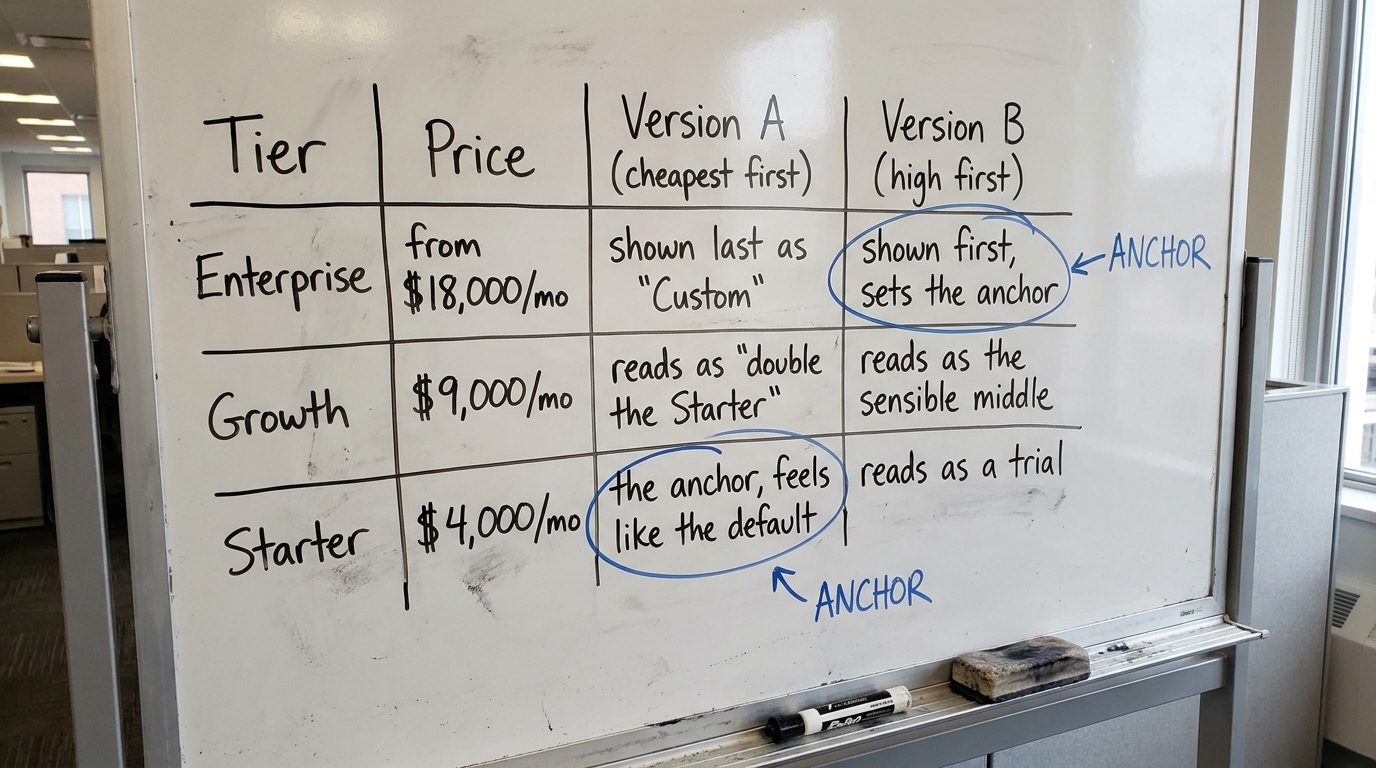
Picture a B2B service firm selling a managed analytics engagement. Compare two ways of ordering the same three tiers. The following is illustrative; it is not a client result.
Version A, cheapest first. The page opens with Starter at $4,000/mo, then Growth at $9,000/mo, then Enterprise at "Custom." A buyer lands on $4,000, anchors there, and reads Growth as more than double. Many stop at Starter or bounce because the jump feels steep.
Version B, high anchor first. The page opens with Enterprise, described as "from $18,000/mo," then Growth at $9,000/mo marked as the common choice, then Starter at $4,000/mo. The buyer anchors near $18,000, and Growth now reads as the sensible middle rather than a stretch. Starter reads as a trial, not the default.
Same three prices, different first number, different sense of what is expensive. The point is not that Version B always wins. The point is that Version A also set an anchor; it just set a low one by accident, and then asked the buyer to climb away from it.
5. The table to work from
Use this to find where you are setting an anchor, what the buyer does with it, and the one change that moves it. Treat the "what to change" column as a default, not a rule; a firm that sells almost entirely into price-sensitive small accounts may want the low anchor on purpose.
| Where this shows up | What the buyer does | What to change |
|---|---|---|
| Pricing page, tier order | Anchors to whichever tier they read first and judges the rest against it | Put the tier you want to anchor to first, and label the target tier as the common choice |
| Enterprise or "Custom" tier | Reads the top of the range as the ceiling, which lifts the perceived value of everything below | Give the top tier a "from $X" figure instead of a blank "Custom" so it anchors instead of hiding |
| Monthly vs annual toggle | Anchors to the first figure shown, then reacts to the second as large or small | Default to annual-billed-monthly ($X/mo, billed annually) so the smaller number anchors |
| ROI or savings line | Reads the fee against the stated return rather than against zero | State the return figure above the price, with the method behind it, so the price is judged in context |
| Proposal | Anchors to the first number in the document, often the total | Lead with the full-value figure, then the investment, then any phased or discounted option |
| Sales call | Anchors to the first price the rep says aloud | Brief reps to open at list, never at the discounted rate, so there is room to move |
| No price anywhere | Brings a reference price built from competitors or an AI assistant | Show at least a starting figure or a range so you, not a third party, set the anchor |
6. How to pick the anchor without misleading anyone
Anchoring crosses a line when the first number is not a real option. A "from $18,000" enterprise tier that no one can actually buy at $18,000 is a trick, and buyers who reach the sales call find out. Nielsen Norman Group's usability research is consistent on this: pricing that feels manipulative on inspection costs you more trust than the extra conversion is worth.
Pick an anchor you can stand behind. The high tier should be a tier someone has bought. The ROI figure should come from engagements you can describe. The list price the rep opens with should be the price on the page. Anchoring works because the number is credible; a number the buyer can disprove in one click anchors to nothing.
Mario Peshev's write-up of WordPress services and his pricing strategy is a useful read on holding a real list price and letting the range do the framing rather than discounting into it.
7. What to change on your page this week
Pick the changes you can ship in a few days, not a full repricing project.
- Open your pricing page with the tier you want to anchor to, and mark your target tier as the common choice. If your tiers run cheapest-first today, that reorder is a single change.
- Replace any blank "Custom" or "Contact us" at the top of the range with a real "from $X" figure, so the ceiling anchors instead of leaving the buyer to guess.
- Set the monthly/annual toggle to default to the annual-billed-monthly figure, and show the annual total as the secondary line.
- Price comes after return, and the return is only credible if the method is visible. State the IRR or payback in the first line, name the baseline you measured from and the period over which you measured it, then give the price. If you cannot name the baseline and the method in one sentence, the figure is a claim you cannot support and you leave it out.
- If you show no price at all, add a starting figure or a range. You are one of the 97% handing the anchor to someone else, and a single number takes it back.
- Brief your reps to open proposals and calls at list, with the full-value figure stated before the investment figure.
Do one of these, watch it for two weeks, then do the next. A tier reorder and a real enterprise figure are usually the two that move the most, because they change the first number without changing any price you charge.
If you want to see what anchor your own homepage sets before a buyer talks to you, run Behavly's free homepage check on your page.